
USB HID
The RP2350 USB controller can be a HID device. rp2350sim is the USB host: it
enumerates the device, reads the HID report descriptor, decodes input reports
and can send output reports back. The same model is used by the HID tab and
by the headless runner.
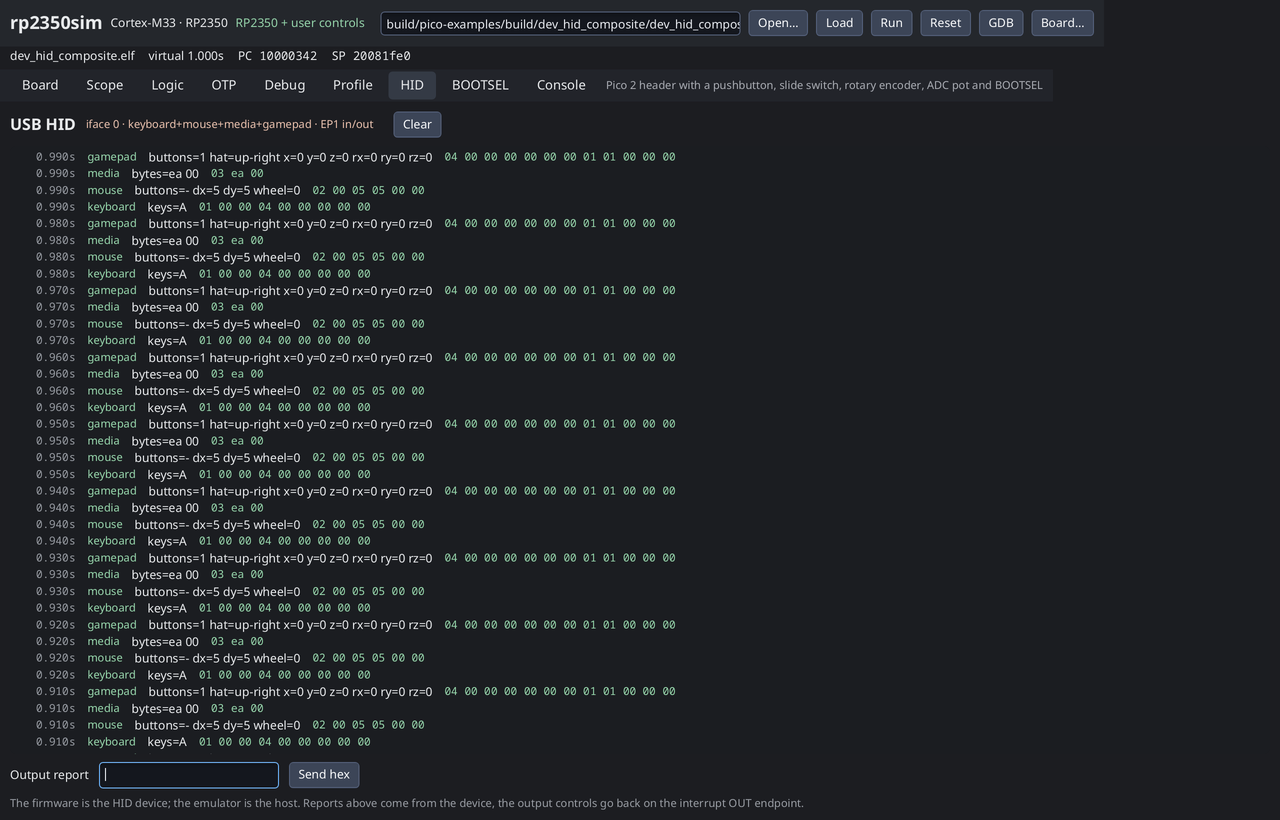
- Keyboard, mouse, consumer/media and gamepad reports.
- Composite devices with several HID interfaces.
- Report IDs and per-report sizes and logical ranges taken from the report descriptor, so custom gamepad layouts work without a hardcoded format.
- Standard device enumeration: configuration descriptor, interface and endpoint
descriptors, HID report descriptor,
SET_IDLE. - Interrupt IN reports and interrupt OUT reports (keyboard LEDs, gamepad feedback, generic output reports).
The firmware is the device and the emulator is the host. The monitor therefore shows device-to-host reports; the output controls send host-to-device reports.
The tab appears once the firmware enumerates a HID interface. The header names the interface and its report kinds, for example:
USB HID iface 0 · keyboard+mouse+media+gamepad · EP1 in/out
The monitor lists reports newest first with:
- virtual time in seconds;
- decoded kind (
keyboard,mouse,media,gamepad); - readable text (
keys=A,buttons=left dx=12,buttons=1 hat=right); - the raw report bytes in hex.
The bottom row sends host-to-device output: Num/Caps/Scroll keyboard LEDs and a generic output-report hex field with Send hex. Keyboard LEDs use the report ID from the firmware’s report descriptor; a boot keyboard without report IDs gets the one-byte LED report.
task ui:hid            # TinyGo keyboard + mouse
task ui:hidgamepad     # TinyGo joystick
task ui:hid:composite  # pico-sdk keyboard/mouse/media/gamepad
task ui:hid:png        # render the tab to build/ui-hid.png
ui:hid:composite latches BOOTSEL because the pico-sdk dev_hid_composite
example only reports while that pin is held.
| flag | meaning |
|---|---|
-usb-hid |
log every decoded input report |
-hid-out HEX |
send one output report once the interrupt OUT endpoint is armed |
# Keyboard and mouse reports
rp2350sim -fw build/hid.elf -seconds 3 -usb-hid

# Send NumLock (report 02, LED bit 01) after enumeration
rp2350sim -fw build/hid.elf -seconds 3 -usb-hid -hid-out 0201

# Report IDs and a custom gamepad layout
rp2350sim -fw build/hidgamepad.elf -seconds 3 -usb-hid

# pico-sdk composite example: it reports while BOOTSEL is held
rp2350sim -fw dev_hid_composite.elf -seconds 1 -bootsel -usb-hid
Reports are slog records on stderr:
{"msg":"usb hid","interface":0,"kind":"keyboard","report":"keys=A","bytes":"01 00 04 00 00 00 00 00"}
{"msg":"usb hid","interface":0,"kind":"mouse","report":"buttons=left dx=0 dy=0 wheel=0","bytes":"01 01 00 00 00"}
Use -quiet only if you do not need the report stream; -usb-hid records are
informational.
firmware/hid— TinyGo keyboard + mouse + media descriptor.firmware/hidgamepad— TinyGo joystick with report IDs.- pico-sdk
dev_hid_composite— keyboard, mouse, media and gamepad in one composite device; reports only while BOOTSEL is held.
All three are covered by task smoke / the pico-examples checks.
The HID tab works in the WebAssembly build, including the report monitor and output controls. Like the rest of the browser build it has no host sockets or process execution, but HID needs neither. See the browser build.
- One device configuration with interrupt IN and optional interrupt OUT endpoints. USB hubs, suspend/resume, isochronous transfers and feature-report control transfers are not modelled.
- The emulator decodes HID input reports; it does not inject keyboard or mouse input into the firmware. Firmware sees only the device’s own reports and the output reports you send.
- CDC and MIDI are separate USB models; a composite CDC+HID device exposes both consoles/tabs, but their traffic is not mixed.